Led astray#
Sat 30 Jan 2021 12:46:06 PM UTC
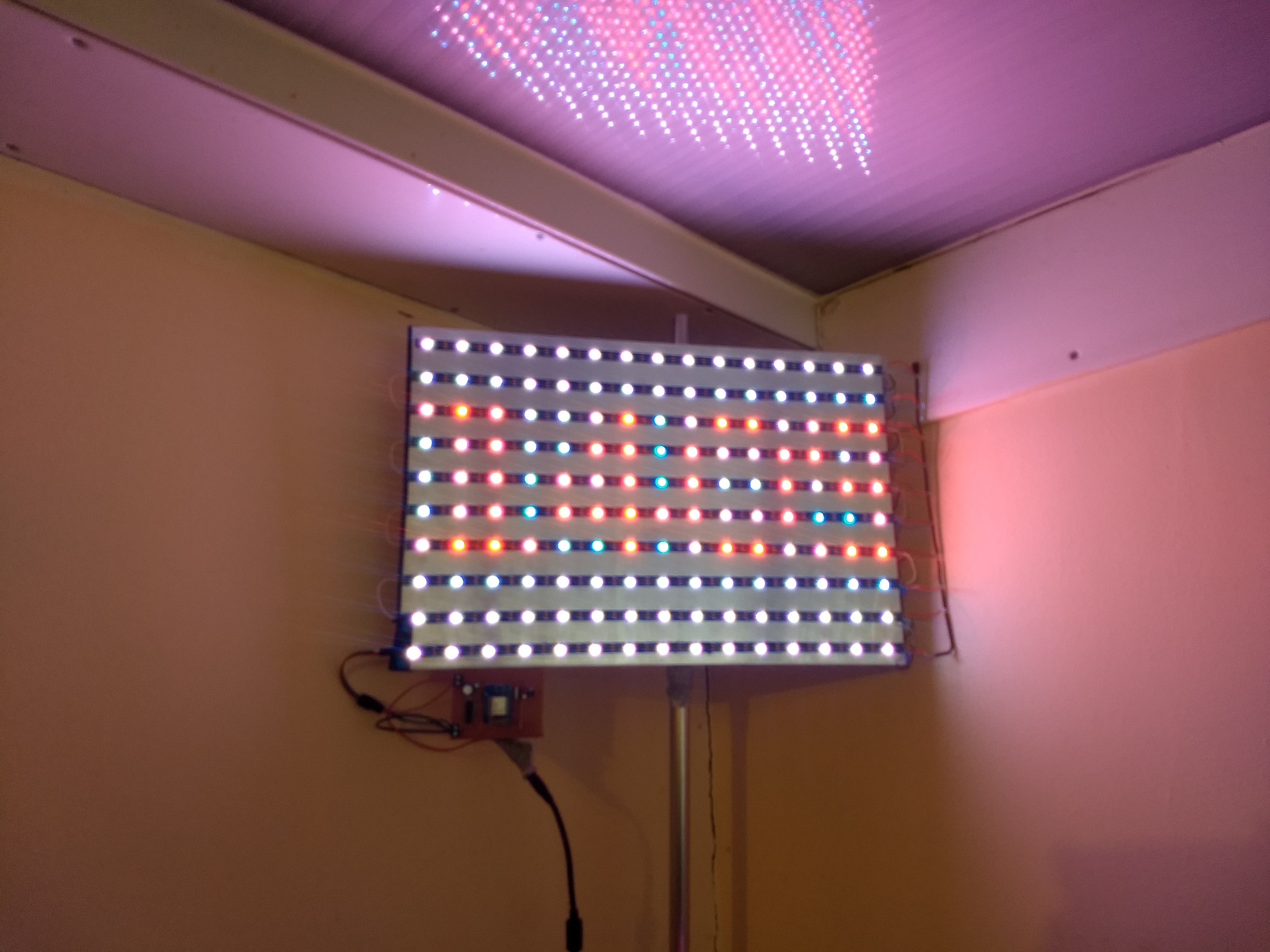
There are probably better ways to satisfy the need for a wall light than
- cutting up a 150 LED Neopixel strip, sticking the pieces to a piece of aluminum, then soldering wires from each row to the next
- building a ESP8226 circuit on stripboard to drive it
- sending 10x15 arrays of RGB over MQTT to specify colours
The led strip came from my Christmas lights, as did the
circuit - now transferred from breadboard to a more permanent soldered
stripboard. The Arduino sketch, known as Dolores ("do lo-res") is all new, though, and
parts of it (the bits that are plain C++ not Arduino code) are even unit-tested.
Perhaps worth noting
-
10x15 pixels with a byte each for R G B is 450 bytes of data, which
is more than the default max packet size of the Arduino MQTT
library I'm using. Fix this with a call to
client.setBufferSize
with a more appropriate value
-
after the first time I'd put it all together and installed it on the
wall, I realised that software updates were going to be considerable
faff, given they require unplugging the Wemos D1 from its circuit
and attaching it to USB. OTA updates to the
rescue! This makes the device run a HTTP server which new images
can be POSTed to. There are better ways to do this - I'd rather it
were an HTTP client which fetched images from a known URL, instead
of accepting anything from anyone that can reach its port 80 - but
that can wait until I have some kind of CI setup.
-
the Nix environment I'm using for Arduino IDE only works with
nix-shell not nix-build. I'd like it to behave as a regular
derivation so I can have a CI setup
But now I can send it any picture I like. Here's a digital clock -
while sleep 2 ; do \
  ( convert -support .5 -depth 8 -fill red \
            -font DejaVu-Sans-Condensed -pointsize 7 -size 15x10! \
	    -draw "text 0,7 '$(date +%H%M)'" -sharpen 8 'xc:#333'  RGB:- | \
    tee out.rgb | \
    nix run nixos.mosquitto -c mosquitto_pub  -h mymqttserver.lan \
    	    		         -s --username username --pw password  \
				 -t effects/84F3EBE5E57C/image ) ; \
done
Her name is Oreo#
Fri 12 Feb 2021 12:47:14 PM UTC
I am at a point somewhere along the way of a long yak-shaving journey
("I wonder if the MSM8953 SoC supports ANT+ in hardare and it just
needs enabling in the Android software?") which involves rebuilding
Android for my phone. There seem to be very few ROMs for the Moto G5
Plus ("potter") that are still being maintained, and even fewer of
them that have build instructions that (a)
work as described;
(b) comprise
fewer than 30 manual steps. Do Android ROM
developers not do CI builds? If this was all GPL I could make a strong
case it's in breach. ("The source code for a work means the preferred
form of the work for making modifications to it [...] all the source
code for all modules it contains, plus any associated interface
definition files, plus the scripts used to control compilation and
installation of the executable."). Yes, I know, volunteers, spare
time, teeth of gift horses, etc etc. End rant
Anyway, so far I am doing the following and it has not yet blown up
-
using the docker image from LineageOS for Microg
-
invoking it as follows
docker run \
    -e "BRANCH_NAME=lineage-15.1" \
    -e "DEVICE_LIST=potter" \
    -e "SIGN_BUILDS=false" \
    -e "SIGNATURE_SPOOFING=restricted" \
    -e "INCLUDE_PROPRIETARY=false" \
    -e "WITH_SU=true" \
    -e "CUSTOM_PACKAGES=GmsCore GsfProxy FakeStore MozillaNlpBackend NominatimNlpBackend com.google.android.maps.jar FDroid FDroidPrivilegedExtension " \
    -v "/$HOME/src/android/l4mg/lineage:/srv/src" \
    -v "/$HOME/src/android/l4mg/zips:/srv/zips" \
    -v "/$HOME/src/android/l4mg/logs:/srv/logs" \
    -v "/$HOME/src/android/l4mg/cache:/srv/ccache" \
    -v "/$HOME/src/android/l4mg/keys:/srv/keys" \
    -v "/$HOME/src/android/l4mg/manifests:/srv/local_manifests" \
    lineageos4microg/docker-lineage-cicd
- with this manifest in
$HOME/src/android/l4mg/manifests/roomservice.xml
<?xml version="1.0" encoding="UTF-8"?>
<manifest>
	<project name="LineageOS/android_external_bson" path="external/bson" remote="github" revision="cm-14.1" />
	<project name="LineageOS/android_device_qcom_common" path="device/qcom/common" remote="github" revision="lineage-15.1" />
	<project name="LineageOS/android_packages_resources_devicesettings" path="packages/resources/devicesettings" remote="github" revision="staging/lineage-15.1" />
	<project name="boulzordev/android_device_motorola_potter" path="device/motorola/potter" remote="github" revision="lineage-15.1-64" />
	<project name="boulzordev/android_vendor_motorola_potter" path="vendor/motorola/potter" remote="github" revision="lineage-15.1-64" />
	<project name="boulzordev/android_kernel_motorola_msm8953" path="kernel/motorola/msm8953" remote="github" revision="lineage-15.1-64" />
</manifest>
Worthy of note:
-
I found the manifest on the Interwebz by use of a search engine. I had to edit the revision attribute of android_device_qcom_common from staging/lineage-15.1 to lineage-15.1
-
because I have a (presumed working) example manifest for 15.1 I am
not attempting to build any newer version. One change at a time,
hey
-
in my limited understanding, the manifest tells the build system
where to find Moto proprietary files, and the
INCLUDE_PROPRIETARY=false build argument tells the L4microg build
scripting not to try and download them from "TheMuppets". This is
important because the muppets don't have them for my device.
-
getting F-droid and Microg baked in is probably no bad thing
As I write this, it has been building for ~ 30 minutes and not fallen
over yet, so things are looking vaguely promising
[ 8% 8343/95970] target thumb C++: libv8src_32 <= external/v8/src/builtins/builtins-constructor.cc
Apparently it's done 8% of something
Update: Fri Feb 12 19:57:48 GMT 2021
It works! It built a buch of stuff in zips/potter/ including the file
lineage-15.1-20210212-UNOFFICIAL-potter.zip which I installed from Recovery
using the instructions at https://wiki.lineageos.org/devices/peregrine/install
Yes, that's not the same phone, but it's close enough to use the same procedure