The European Union must keep funding free software#
Tue, 16 Jul 2024 22:56:18 +0000
This is an open letter initially published in French by the Petites Singularités association. To co-sign it, please publish it on your website if your preferred language, then add yourself to this table.
Thanks to Jeremiah Lee for the easy-to-copy-paste HTML version.
Since 2020, the Next Generation Internet (NGI) program, part of European Commission’s Horizon program, funded free software in Europe using a cascade funding mechanism (see for example NLnet’s calls). This year, according to the Horizon Europe working draft detailing funding programs for 2025, we noticed the Next Generation Internet is not mentioned as part of Cluster 4.
NGI programs have demonstrated their strength and importance in supporting the European software infrastructure, as a generic funding instrument to fund digital commons and ensure their long-term sustainability. We find this transformation incomprehensible, moreover when NGI has proven efficient and ecomomical to support free software as a whole, from the smallest to the most established initiatives. This ecosystem diversity backs the strength of European technological innovation. Maintaining the NGI initiative to provide structural support to software projects at the heart of worldwide innovation is key to enforce the sovereignty of a European infrastructure. Contrary to common perception, technical innovations often originate from European rather than North American programming communities and are mostly initiated by small-scaled organizations.
Previous Cluster 4 allocated 27 millions euros to:
- “Human centric Internet aligned with values and principles commonly shared in Europe”
- “A flourishing Internet, based on common building blocks created within NGI, that enables better control of our digital life”
- “A structured eco-system of talented contributors driving the creation of new Internet commons and the evolution of existing internet commons”
In the name of these challenges, more than 500 projects received NGI0 funding in the first 5 years, backed by 18 organizations managing these European funding consortia.
NGI contributes to a vast ecosystem, as most of its budget is allocated to fund third parties by the means of open calls, to structure commons that cover the whole Internet scope—from hardware to application, operating systems, digital identities, or data traffic supervision. This third-party funding is not renewed in the current program, leaving many projects short on resources for research and innovation in Europe.
Moreover, NGI allows exchanges and collaborations across all the EU zone, as well as “widening countries”, currently both a success and an ongoing progress, like the Erasmus program before us. NGI0 also contributes to opening and maintaining longer relationships than strict project funding does. It encourages the implementation of funded projects through pilots and supports collaboration within intiatives, as well as the identification and reuse of common elements across projects, interoperability in identification systems and beyond, and the establishment of development models that integrate other sources of financings at different scales in Europe.
While the USA, China, or Russia deploy huge public and private resources to develop software and infrastructure that massively capture private consumer data, the EU can’t afford this renunciation. Free and open source software, as supported by NGI since 2020, is by design the opposite of potential vectors for foreign interference. It lets us keep our data local and favors a community-wide economy and know-how, while allowing an international collaboration. This is all the more essential in the current geopolitical context: the challenge of technological sovereignty is central and free software makes it possible to respond to it while acting for peace and sovereignty in the digital world as a whole.
In this perpective, we urgently ask you to call for the preservation of the NGI program in the 2025 funding program.
Simple minds#
Thu, 07 Dec 2023 22:52:36 +0000
I responded to a Linkedin post about refactoring code the other day, referencing the J B Rainsberger "Simple Code Dynamo"", and I don't think I said all I wanted to say: specifically about why I like it.
A common refrain I hear when I talk with other developers about refactoring is that it has low or no value because it's subjective. You like the inlined code, I like the extracted method. He likes the loop with a repeated assignment, they like the map/reduce. Tomato/tomato. Who's to say which is better objectively? If you consult a catalog of refactoring techniques you'll see that approximately half of them are inverses of the other half, so technically you could be practicing "refactoring" all day and end up with the code in exactly the same place as where you started. And that's not delivering shareholder value/helping bring about the Starfleet future (delete as applicable).
What does the Simple Code Dynamo bring to this? We start with a definition of "Simple" (originally from Kent Beck):
- passes its tests
- minimises duplication
- reveals its intent
- has fewer classes/modules/packages
[Kent] mentioned that passing tests matters more than low duplication, that low duplication matters more than revealing intent, and that revealing intent matters more than having fewer classes, modules, and packages.
This is the first reason I like it: *it gives us a definition of "good"*. It's not an appeal to authority ("I made it follow the 'Strategy' pattern, so it must be better now") or a long list of "code smells" that you can attempt to identify and fix, it's just four short principles. And actually for our purposes it can be made shorter. How?
Let's regard rule 1 ("Passes tests") as an invariant, pretty much: if the code is failing tests, you are in "fix the code" mode, not in "refactor" mode. So we put that to one side.
What about rules 2 and 3? There has been much debate over their relative order, and the contention in this article is that it turns out not to matter , because they reinforce each other.
- when we work on removing duplication, often we create new functions with the previously duplicated code and then call them from both sites. These functions need names and often our initial names are poor. So ...
- when we work on improving names, we start seeing the same names appearing in distant places, or unrelated names in close proximity. This is telling us about (lack of) cohesion in our code, and fixing this leads to better abstractions. But ...
- now we're working at a higher level of abstraction, we start noticing duplication all over again - so, "GOTO 10" as we used to say.
You should read the article if you haven't, because this blog post is not to paraphrase it but to say why I like it, and this is the second - and in some ways, the more powerful - reason. It gives us a place to start. Instead of being reduced to looking despairingly at the code and saying where do I even begin? (often followed 15 minutes later with "I want to kill it with fire"), we have an in. Fix a poor name. Extract a method to remove some duplication. You aren't choosing to attack the wrong problem first, because they're both facets of the same problem.
For me this is, or was, liberatory, and I share it with you in case it works for you too.
(For completeness: yes, we have basically ignored rule 4 here - think of it as a tie breaker)
Illogical Volume Management#
Sun, 16 Jul 2023 12:29:18 +0000
I bought a new SSD for my primary desktop system, because the spinning rust storage I originally built it with is not keeping up with the all the new demands I'm making of it lately: when I sit down in front of it in the morning and wave the mouse around, I have to sit listening to rattly disk sounds for tens of seconds while it pages my desktop session back in. For reasons I can no longer remember, the primary system partition /dev/sda3 was originally set up as a LVM PV/VG/VL with a bcache layered on top of that. I took the small SSD out to put the big SSD in, so this seemed like a good time to straighten that all out.
Removing bcache
Happily, a bcache backing device is still readable even after the cache device has been removed.
echo eb99feda-fac7-43dc-b89d-18765e9febb6 > /sys/block/bcache0/bcache/detach
where the value of the uuid eb99...ebb6 is determined by looking in /sys/fs/bcache/ (h/t DanielSmedegaardBuus on Stack Overflow )
It took either a couple of attempts or some elapsed time for this to work, but eventually resulted in
# cat /sys/block/bcache0/bcache/state
no cache
so I was able to boot the computer from the old HDD without the old SSD present
Where is my mind?
At this time I did a fresh barebones NixOS 23.05 install onto the new SSD from an ISO image on a USB stick. Then I tried mounting the old disk to copy user files across, but it wouldn't. Even, for some reason, after I did modprobe bcache. Maybe weird implicit module dependencies?
The internet says that you can mount a bcache backing device even without bcache kernel support, using a loop device with an offset:
If bcache is not available in the kernel, a filesystem on the backing device is still available at an 8KiB offset.
... but, that didn't work either? binwalk will save us:
$ nix-shell -p binwalk --run "sudo binwalk /dev/backing/nixos"|head

DECIMAL       HEXADECIMAL     DESCRIPTION
--------------------------------------------------------------------------------
41943040      0x400000        Linux EXT filesystem, blocks count: 730466304, image size: 747997495296, rev 1.0, ext4 filesystem data, UUID=37659245-3dd8-4c60-8aec-cdbddcb4dcb4, volume name "nixos"
The offset is not 8K, it's 8K * 512. Don't ask me why, I only work here. So we can get to the data using
$ sudo mount /dev/backing/nixos /mnt -o loop,offset=4194304
and copy across the important stuff like /home/dan/src and my .emacs. But I'd rather like a more permanent solution as I want to carry on using the HDD for archival (it's perfectly fast enough for my music, TV shows, Linux ISOs etc) and nixos-generate-config gets confused by loop devices with offsets.
If it were an ordinary partition I'd simply edit the partition table to add 8192 sectors to the start address of sda3, but I don't see a straightforward way to do the analogous thing with a logical volume.
Resolution
Courtesy of Andy Smith's helpful blog post (you should read it and not rely on my summary) and a large degree of luck, I was able to remove the LV completely and turn sda3 back into a plain ext4 partition. We follow the steps in his blog post to find out how many sectors at the start of sda3 are reserved for metadata (8192) and how big each extent is (8192 sectors again, or 4MiB). Then when I looked at the mappings:
sudo pvdisplay --maps /dev/sda3
  --- Physical volume ---
  PV Name               /dev/sda3
  VG Name               backing
  PV Size               2.72 TiB / not usable 7.44 MiB
  Allocatable           yes (but full)
  PE Size               4.00 MiB
  Total PE              713347
  Free PE               0
  Allocated PE          713347
  PV UUID               7ec302-b413-8611-ea89-ed1c-1b0d-9c392d

  --- Physical Segments ---
  Physical extent 0 to 713344:
    Logical volume	/dev/backing/nixos
    Logical extents	2 to 713346
  Physical extent 713345 to 713346:
    Logical volume	/dev/backing/nixos
    Logical extents	0 to 1
It's very nearly a continuous run, except that the first two 4MiB chunks are at the end. But ... we know there's a 4MiB offset from the start of the LV to the ext4 filesystem (because of bcache). Do the numbers match up? Yes!
Physical extent 713345 to 713346 are the first two 4MiB chunks of /dev/backing/nixos. 0-4MiB is bcache junk, 4-8MiB is the beginning of the ext4 filesystem, all we need to do is copy that chunk into the gap at the start of sda3 which was reserved for PV metadata:
# check we've done the calculation correctly
# (extent 713346 + 4MiB for PV metadata)
$ sudo dd if=/dev/sda3 bs=4M skip=713347  count=1 | file -
/dev/stdin: Linux rev 1.0 ext4 filesystem data, UUID=37659245-3dd8-4c60-8aec-cdbddcb4e3c8, volume name "nixos" (extents) (64bit) (large files) (huge files)
# save the data
$ sudo dd if=/dev/sda3 bs=4M skip=713347  count=1 of=ext4-header

# backup the start of the disk, in case we got it wrong
$ sudo dd if=/dev/sda3 bs=4M  count=4 of=sda3-head

# deep breath, in through nose
# exhale
# at your own risk, don't try this at home, etc etc
$ sudo dd bs=4M count=1 conv=nocreat,notrunc,fsync if=ext4-header of=/dev/sda3
$
It remains only to fsck /dev/sda3, just in case, and then it can be mounted somewhere useful.
With hindsight, the maths is too neat to be a coincidence, so I think I must have used some kind of "make-your-file-system-into-a-bcache-device tool" to set it all up in the first place. I have absolutely no recollection of doing any such thing, but Firefox does say I've visited that repo before ...
Turning the nftables#
Fri, 02 Jun 2023 23:16:32 +0000
In the course of Liminix hacking it has become apparent that I need to understand the new Linux packet filtering ("firewall") system known as nftables
The introductory documentation for nftables is a textbook example of pattern 1 in Julia Evans Patterns in confusing explanations document. I have, nevertheless, read enough of it that I now think I understand what is going on, and am ready to attempt the challenge of describing
nftables without comparing to ip{tables,chains,fw}
We start with a picture:
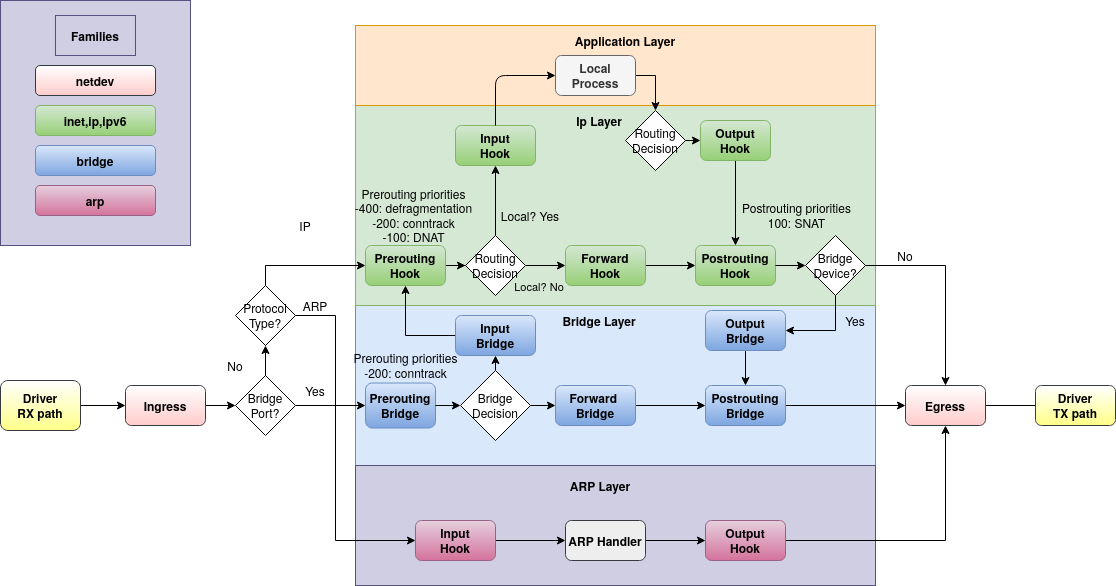
This picture shows the flow of a network packet through the Linux kernel. Incoming packets are received from the driver on the far left and flow up to the aplication layer at the top, or rightwards to the be transmitted through the driver on the right. Locally generated packets start at the top and flow right.
The round-cornered rectangles depict hooks, which are the places where we can use nftables to intercept the flow and handle packets specially. For example:
- if we want to drop packets before they reach userspace (without affecting forwarding) we could do that in the "input" hook.
- if we want to do NAT - i.e. translate the network addresses embedded in packets from an internal 192.168.. (RFC 1918) network to a real internet address, we'd do that in the "postrouting" hook (and so that we get replies, we'd also do the opposite translation in the "prerouting" hook)
- if we're being DDoSed, maybe we want to drop packets in the "ingress" hook before they get any further.
The picture is actually part of the docs and I think it should be on the first page.
Chains and rules
A chain (more specifically, a "base chain") is registered with one of the hooks in the diagram, meaning that all the packets seen at that point will be sent to the chain. There may be multiple chains registered to the same hook: they get run in priority order (numerically lowest to highest), and packets accepted by an earlier chain are passed to the next one.
Each chain contains rules. A rule has a match - some criteria to decide which packets it applies to - and an action which says what should be done when the match succeeds.
A chain has a policy (accept or drop) which says what happens if a packet gets to the end of the chain without matching any rules.
You can also create chains which aren't registered with hooks, but are called by other chains that are. These are termed "regular chains" (as distinct from "base chains"). A rule with a jump action will execute all the rules in the chain that's jumped to, then resume processing the calling chain. A rule with a goto action will execute the new chain's rules in place of the rest of the current chain, and then the packet will be accepted or dropped as per the policy of the base chain.
[ Open question: the doc claims that a regular chain may also have a policy, but doesn't describe how/whether the policy applies when processing reaches the end of the called chain. I think this omission may be because it is incorrect in the first claim: a very sketchy reading of the source code suggests that you can't specify policy when creating a chain unless you also specify the hook. Also, it hurts my brain to think about it. ]
Chain types
A chain has a type, which is one of filter, nat or route.
filter does as the name suggests: filters packets.nat is used for NAT - again, as the name suggests. It differs from filter in that only the first packet of a given flow hits this chain; subsequent packets bypass it.route allows changes to the content or metadata of the packet (e.g. setting the TTL, or packet mark/conntrack mark/priority) which can then be tested by policy-based routing (see ip-rule(8)) to send the packet somewhere non-usual. After the route chain runs, the kernel re-evaluates the packet routing decision - this doesn't happen for other chain types. route only works in the output hook.
Tables
Chains are contained in tables, which also contain sets, maps, flowtables, and stateful objects. The things in a table must all be of the same family, which is one of
ip - IPv4 trafficip6- IPv6 trafficinet - IPv4 and IPv6 traffic. Rules in an inet chain may match ipv4 or ipv6 or higher-level protocols: an ipv6 packet won't be tested against an ipv4 rule (or vice versa) but a rule for a layer 3 protocol (e.g. UDP) will be tried against both. (Some people [who?] claim this family is less useful than you might first think it would be and in practice you just end up writing separate but similar chains for ip and ip6)arp - note per the diagram that there is a disjoint set of hooks for ARP traffic, which allow only chains in arp tablesbridge - similarly, another set of hooks for bridge trafficnetdev - for chains attached to the ingress and egress hooks, which are tied to a single network interface and see all traffic on that interface. This hook/chain type gives great power but correspondingly great faff levels, because the packets are still pretty raw. For example, the ingress chain runs before fragmented datagrams have been reassembled, so you can't match e.g. UDP destination port as it might not be present in the first fragment.
There's a handy summary in the docs describing which chains work with which families and which tables.
What next?
I hope that makes sense. I hope it's correct :-). I haven't explained anything about the syntax or CLI tools because there are perfectly good docs for that already which you now have the background to understand.
Now I'm going to read the script I cargo-culted when I wanted to see if Liminix packet forwarding was working, and replace/update it to perform as an adequate and actually useful firewall
Self-ghosting email#
Tue, 21 Mar 2023 22:13:55 +0000
[ Reminder: more regular updates on what I'm spending most of my time on lately are at https://www.liminix.org/ ]
I had occasion recently to set up some mailing lists and although the subject matter for those lists is Liminix-relevant, the route to their existence really isn't. So, some notes before I forget:
Anyway, that's where we are. I'm quite certain I've done something wrong, but I'm yet to discover what.